
Pipelines as data (JSON or TOML)
A spec names a recording, the operations and the output, as nodes and edges. dspk.pipeline.run
streams the recording window by window through the device and writes the output, plus the spec
itself next to it (<output>.pipeline.json, every default written out and the runtime that ran),
so every result says how it was made. The same spec runs from Python, from the CLI
(dspk run spec.toml) and in the app’s Pipeline workspace.
from pathlib import Pathimport jsonimport tempfile
import numpy as np
import dspkfrom plating import signals
work = Path(tempfile.mkdtemp(prefix="dspk-playground-"))s = signals.synthetic()dspk.io.write_raw(s.data, work / "recording.bin", s.sample_rate, format="int16", gain=0.195, unit="µV")
spec = {    "dspk_pipeline": 1,    "name": "notch + band-pass + CMR",    "nodes": {        "raw": {"op": "read", "path": "recording.bin"},        "notch": {"op": "notch", "freq": 60.0, "q": 30.0},        "band": {"op": "iir", "band": "bandpass", "cutoff": [300.0, 6000.0]},        "cmr": {"op": "cmr"},        "out": {"op": "write", "path": "filtered.zarr", "format": "zarr"},    },    "edges": [["raw", "notch"], ["notch", "band"], ["band", "cmr"], ["cmr", "out"]],}print(json.dumps(dspk.pipeline.canonical(spec)["nodes"]["band"]))  # every default written out(plan,) = dspk.pipeline.plan(spec, work)  # what it would do, without runningprint({k: plan[k] for k in ("mode", "halo", "windows", "stored_upload")})(report,) = dspk.pipeline.run(spec, work)print({k: report[k] for k in ("mode", "runtime", "windows", "seconds")})
The same spec as TOML (comments allowed) gives the same file
(work / "spec.toml").write_text('''dspk_pipeline = 1name = "notch + band-pass + CMR"edges = [["raw", "notch"], ["notch", "band"], ["band", "cmr"], ["cmr", "out"]]
[nodes.raw]op = "read"path = "recording.bin"
[nodes.notch]op = "notch"   # mains humfreq = 60.0q = 30.0
[nodes.band]op = "iir"band = "bandpass"cutoff = [300.0, 6000.0]
[nodes.cmr]op = "cmr"
[nodes.out]op = "write"path = "from_toml.zarr"format = "zarr"''')(report_toml,) = dspk.pipeline.run(work / "spec.toml")out = dspk.io.open(report["output"]).read()print("TOML equals JSON:", np.array_equal(out, dspk.io.open(report_toml["output"]).read()))print("provenance:", report["provenance"])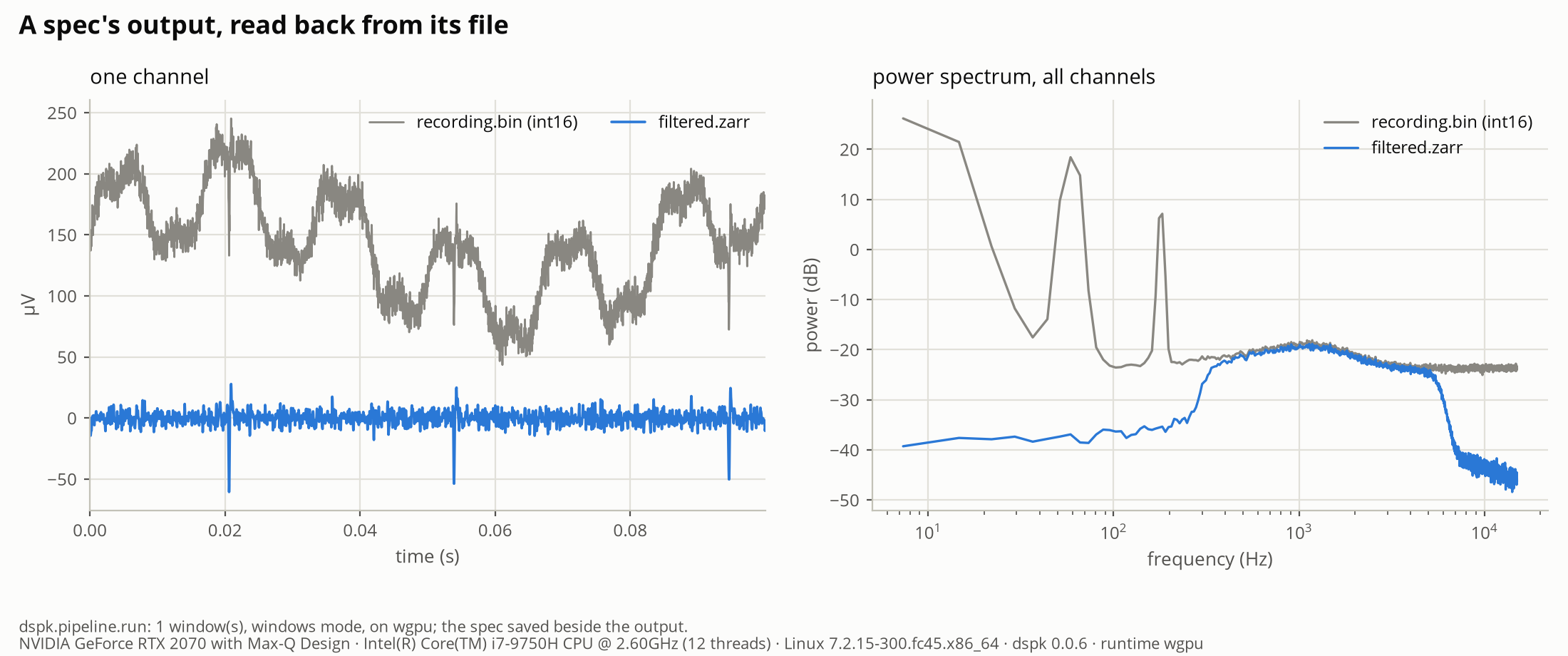
A spec’s output, read back from its file.
The whole script is playground/06_pipelines/03_specs.py. Run it with uv run python playground/06_pipelines/03_specs.py.